How to use the API
The api provides two levels of abstraction one I/O register control and second a higher peripheral level control.
Setup
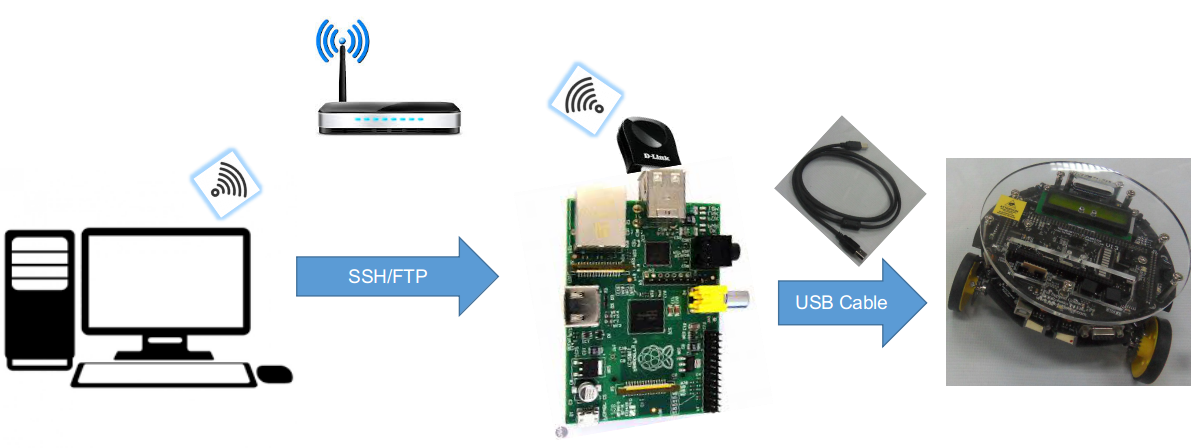
- Connect the system as shown in the figure above.
- Before using the api, load the firmware in the firebird V robot. This firmware is present at source/firmware_ver_1/firmware_ver_1.hex.
- With robotapi installed, you can import it using:
import robotapi as rb
Low Level Abstraction
The function config_register() from the Atmega class will provide control over the I/O ports of the microcontroller.
To use it,
from robotapi import Atmega as at
To access a PORT register of Port J, you can do the following:
at.config_register('PortJ', Pins=[1, 2], set_pins=True)
To access Data direction i.e. DDR register of an I/O port, use
at.config_register('DDRJ', Pins=[1, 2], set_pins=False)
All the pins numbers mentioned inside the list of Pins will be set to logic‘1’ if set_pins=True and logic‘0’ if False
High Level Abstraction
A number of functions in classes Buzzzer and Motion provide a peripheral level abstraction for motion and buzzer control
To use them
from robotapi import Atmega
from robotapi import Buzzer as Buzz
from robotapi import Motion as motion
You can use them as folloes
To turn ON buzzer for 5 seconds
        Buzz.on(5)

To turn OFF buzzer
Buzz.off()
An example of motion control
motion.forward()
This function call moves the robot forward, apart from this left, right, stop, soft-left and soft-right is also possible using corresponding function calls.
Refer to the api documentation for more information about these functions.